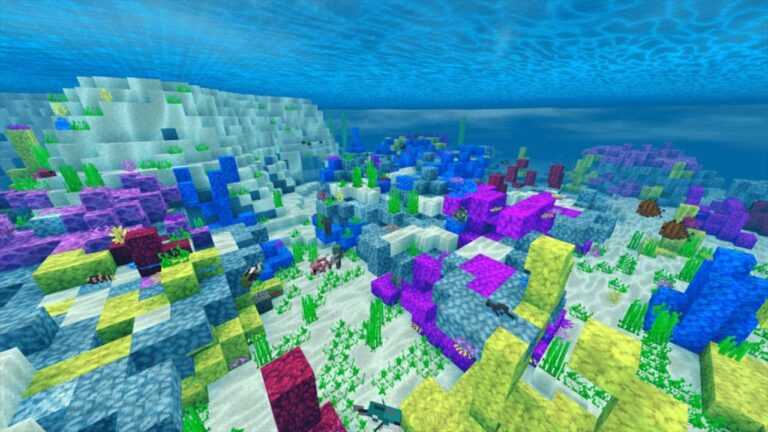
This texture is perfect to maintain the essence of your Minecraft Bedrock, without any need to change the appearance completely, what this texture does is improve certain aspects such as water, sky and some other things, the best of this texture is that It is very light so it will serve you in very low-end devices.
The first of the visual improvements that we are going to find is that birch trees, specifically their leaves, have been enhanced with a slightly orange color that makes our biomes look much better.
Another very good change that I personally like a lot is that the grass no longer looks discolored, but on the contrary, now the color of the grass is much more vivid and it looks much better.
Another change that you will notice is that now both the Sun and the Moon now look incredibly real and specifically at night the stars also look very realistic.
Another improvement is that the water looks very clear, making it possible to see very well under the water, and beautiful glasses
Resolution
X16
How is it installed?
Download the file from the bottom.
After you have downloaded the files, tap on each one and it will automatically take you to your Minecraft, it will import the file into your game.
Then go to the world where you are going to use the downloaded addon: Edit the world> resource packs> (Activate the resource pack) and finally: Edit the world> behavior packs> (Activate the behavior pack)
Credits
The base texture I used is the one created by TheNeitorLol and I have made a bit of changes however he is the one who deserves all the credits, I leave you his YOUTUBE CHANNEL
Si alguna vez pensaste que era difícil transportar tus animales en tu Minecraft Bedrock, este addon es para ti, este nuevo complemento nos agrega redes que nos permites atrapar animales de manera que su transporte será mucho más sencilla y así podrás llevar tus animales de un lugar a otro sin problemas y con un crafteo bastante barato que te dejo a continuación.
Aquí te dejo algunas imágenes por las que te puedes guiar para usar el complemento.
Puedes estar pendiente que se viene una actualización en la que probablemente se pueda usar con addons como el YCRETURES y el de CHOCOBOS!
¿Cómo Se Instala?
Descarga el archivo de la parte inferior.
Luego de haber descargado los archivos, dale un toque a cada uno y te llevará automáticamente a tu Minecraft, importará el archivo a tu juego.
Luego ve al mundo en que vayas a usar el addon descargado: Editar el mundo > paquetes de recursos > (Activas el paquete de recursos) y finalmente: Editar el mundo > paquetes de comportamientos > (Activas el paquete de comportamientos)
Ever wanted your Minecraft Bedrock to be a little more realistic?
Well, it is this time we share an addon that adds new environmental sounds which adapt to the biomes in which you are, the best thing about this complement is that if you have one more biome addon it will be completely compatible so they will not present any problem, and in this way you can use it perfectly, being in your world.
Below I share the list of biomes in which you can find environmental sounds, however you will also have a video in which you can listen to each of them.
How Is It Installed?
Download the file from the bottom. After you have downloaded files, tap on each one and it will automatically take you to your Minecraft, it will import the file into your game.
Then go to the world where you are going to use the downloaded addon: Edit the world> resource packs> (Activate the resource pack) and finally: Edit the world> behavior packs> (Activate the behavior pack)
This is a seed that will be very useful to you since many people are looking to have a world completely ready for construction, that is, completely flat where you can create your buildings without any need to flatten the land, since it is a very large space. . the one who generates this seed for you to build.
To locate this terrain very simply, what you simply have to do is generate the world with the seed that you will have at the end of this page, then as you appear, turn completely, walk a few blocks and you will be able to see the world completely flat and ready for you to let your imagination fly without having to worry about flattening it.
It should also be mentioned that in this seed you will be able to find a wide variety of biomes, for example a desert, birch forests, swamps and the best of all is that everything is within reach of a few blocks from your spawning point, which which means that the orientation in this seed is something you should never worry about.
What is the seed?
The seed is as follows: MCPE
How do I place the seed in my world?
Para colocar la semilla en tu mundo simplemente debes crear un nuevo mundo, luego te vas en el apartado de semilla y escribes es siguiente texto: MCPE
Una vez hecho eso solo quedaría por crear el mundo.
KMPE Shaders is one of the most complete and highly realistic for the Minecraft Bedrock platform, this shader greatly stands out for its realistic water and the characteristic torches that we will see below.
MAIN FEATURES
The water stands out too much for this shader since it is the most realistic that you will find so far for this Minecraft platform (Bedrock).
The shadow of the character also stands out, something that almost no shader on this platform includes, and it also has movement, that is, as you walk, the shadow also moves.
How Is It Installed?
Download the file from the bottom. After you have downloaded files, tap on each one and it will automatically take you to your Minecraft, it will import the file into your game.
Then go to the world where you are going to use the downloaded addon: Edit the world> resource packs> (Activate the resource pack) and finally: Edit the world> behavior packs> (Activate the behavior pack)
This shaders is one of the most realistic loas that you will find for all Minecraft Bedrock, these shaders have exceptional realism so you must have a device that supports it, below I detail some of the most important characteristics and especially those that you will notice the most when testing these shaders in your game.
MAIN FEATURES
Water now has a much more fluid movement and also has a realism that no other shader in Minecraft Bedrock achieves at the moment.
The nights are not too dark and therefore you will not have to occupy too many torches, you will be able to see without any problem.
Sunsets and sunrises turn slightly orange, giving an incredible realism to the game.
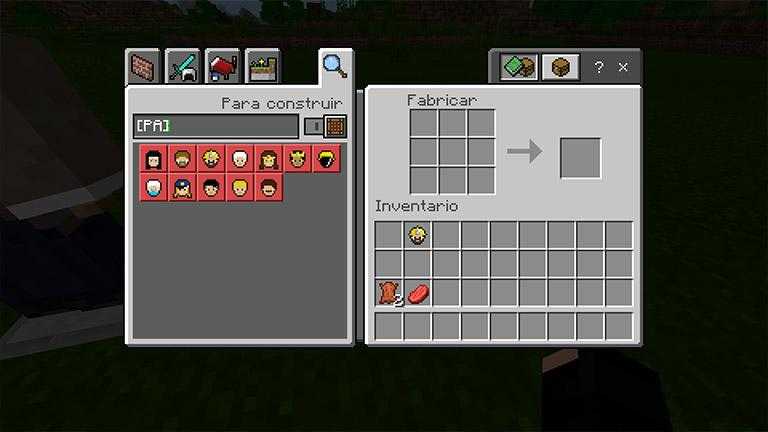
You can find recets on crafting table writing “[PA]”
You just need to equip a helmet and you have the other armor compartiments free to use.
How Is It Installed?
Download the file from the bottom. After you have downloaded files, tap on each one and it will automatically take you to your Minecraft, it will import the file into your game.
Then go to the world where you are going to use the downloaded addon: Edit the world> resource packs> (Activate the resource pack) and finally: Edit the world> behavior packs> (Activate the behavior pack)