
• Lasts Posts
  • Addons
    • All Addons
    • 1.21
    • 1.20
    • 1.19
    • 1.18
    • 1.17
    • 1.16
  • Textures
    • All Textures
    • Improve your game
    • x16
    • x32
    • x64
    • x128
  • Shaders
    • All Shaders
    • Low
    • Medium
    • High
  • Seeds
  • Maps
  • Lasts Posts
  • Addons
    • All Addons
    • 1.21
    • 1.20
    • 1.19
    • 1.18
    • 1.17
    • 1.16
  • Textures
    • All Textures
    • Improve your game
    • x16
    • x32
    • x64
    • x128
  • Shaders
    • All Shaders
    • Low
    • Medium
    • High
  • Seeds
  • Maps

Trains Add-on

Apr 15, 2021

Trains Add-on v2

This is version 2.0 of the original “Trains! Addon steam edition“, with custom craftable trains, new recipes, 8 different color options, and a more improved way of connecting the compartments! Also this time it doesn’t replace minecarts 😀

How to use:

1. Craft and place down the Engine. (recipes are down below, or watch the video)
2. Ride and move forward to adjust the engine’s orientation.
3. Craft the couplers.
4. Crouch and interact with the couplers to spawn a connected carriage or cargo.
5. Repeat step 3 and build your train!
6. Crouch and interact with dyes to color the engine, carriages and cargos. There are total 8 colors available.
7. Ride the engine and move forward, all connected carriages and cargos will move along.
Congratulations you just built your first train!

Recipes:

Bugs and limitations:

1. Random animation glitches at 1st person view
2. Train can’t climb up slopes
3. Leashes are invisible

Useful commands:

/give @s edge:engine_spawn_egg
/give @s edge:carriage_spawn_egg
/give @s edge:cargo_spawn_egg
/give @s edge:carriage_coupler
/give @s edge:cargo_coupler

How Is It Installed?

  1. Download the file from the bottom. After you have downloaded files, tap on each one and it will automatically take you to your Minecraft, it will import the file into your game.
  2. Then go to the world where you are going to use the downloaded addon: Edit the world> resource packs> (Activate the resource pack) and finally: Edit the world> behavior packs> (Activate the behavior pack)

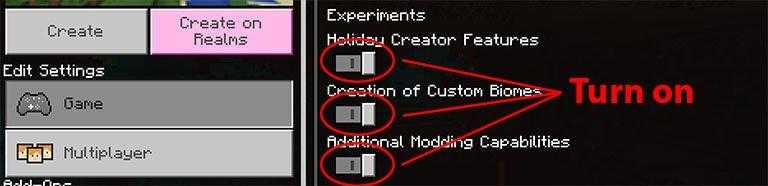
Requires Experiments
Compatible Versions

  • 1.16.100 or higher
  • 1.16 BETA
  • Doesn´t works on another version

Credits

Creator: @da4thedge

Download Addon

  • CLICK HERE TO DOWNLOAD ADDON

Explorer’s World Map & Minimap

Explorer’s World Map & Minimap

A site dedicated to providing new and
updated Minecraft mods to enhance
your gameplay.

  • Follow
  • Follow

Quick links



Addons



Textures



Shaders



Seeds



Maps

Join Us

Subscribe to receive the latest Minecraft mods updates right to your inbox!

© 2026 Universe Bedrock. Al rights reserved.

We are using cookies to give you the best experience on our website.

You can find out more about which cookies we are using or switch them off in .

Powered by  GDPR Cookie Compliance
Privacy Overview

This website uses cookies so that we can provide you with the best user experience possible. Cookie information is stored in your browser and performs functions such as recognising you when you return to our website and helping our team to understand which sections of the website you find most interesting and useful.

Strictly Necessary Cookies

Strictly Necessary Cookie should be enabled at all times so that we can save your preferences for cookie settings.