New Ravager Animations

New Ravager Animations

New Ravager Animations

New ravager animations

This texture pack improves the animations of the ravager to more articulated and animated animations to give a new look to your minecraft, this testure pack improves the animations of:https://1e0c11a629a678c186ec62ba96dfc8b8.safeframe.googlesyndication.com/safeframe/1-0-38/html/container.html

-Move

-stunned

-Attack

you can set this texture pack both to default for you and to a world for your friends to see

This texture pack supports new textures for the ravager but does not support custom models

ANIMATIONS INFORMATIONS:

The walk animation plays when the ravager chases a player, villager, iron golem, etc.
that’s because the ravager plays the walking animation very slowly when not having a target

You can make the stunned animation play when blocking a ravager’s attack with a shield.

How Is It Installed?

  1. Download the file from the bottom. After you have downloaded files, tap on each one and it will automatically take you to your Minecraft, it will import the file into your game.
  2. Then go to the world where you are going to use the downloaded addon: Edit the world> resource packs> (Activate the resource pack).

Download

The Better First Person V0.1

The Better First Person V0.1

The Better First Person V0.1

Didn’t you like the first person in the original? Did you hate the fact that you couldn’t see the player’s legs in the first person? This texture pack will suit your needshttps://bcd0076f103c14237edb55abaaa708ac.safeframe.googlesyndication.com/safeframe/1-0-38/html/container.html

I changed the first person animation of the original to make it more realistic

There are now more realistic weapon animations in the first person

There are now more realistic weapon animations in the first person

sword,axe,pickaxe,hoe,shovel and shield

bow,crossbow and trident

more first person animation

ride

swim

glide

How Is It Installed?

  1. Download the file from the bottom. After you have downloaded files, tap on each one and it will automatically take you to your Minecraft, it will import the file into your game.
  2. Then go to the world where you are going to use the downloaded addon: Edit the world> resource packs> (Activate the resource pack).

Download

New Phantom Animations

New Phantom Animations

New Phantom Animations

NEW PHANTOM ANIMATIONS

This texture pack changes the animations of the phantom to give them a more dynamic and fluid finish, with more movement, the texture pack is compatible with other texture packs that change the texture and the phantom model, as long as the ghost model have the pivot points well, since the animation uses the same groups and model as the original phantom

here you can see the improved animation in detail.

How Is It Installed?

  1. Download the file from the bottom. After you have downloaded files, tap on each one and it will automatically take you to your Minecraft, it will import the file into your game.
  2. Then go to the world where you are going to use the downloaded addon: Edit the world> resource packs> (Activate the resource pack).

Download

VanillaKawaii Texture Pack

VanillaKawaii Texture Pack

VanillaKawaii Texture Pack

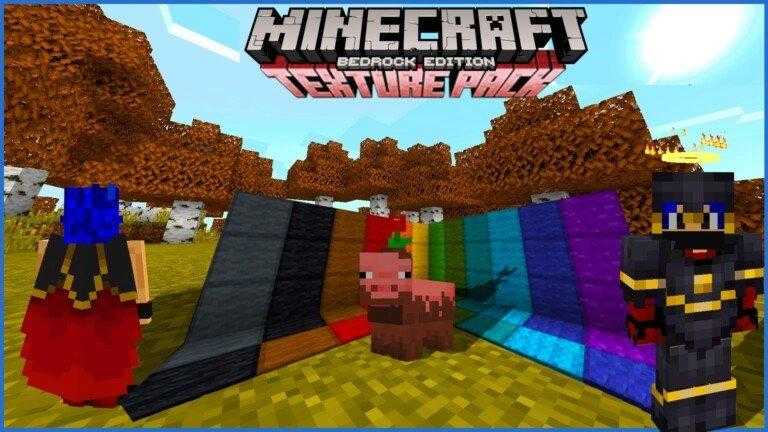
Vanilla Kawaii is a texture created by me (TheNeitorLoL) at the moment it is only for Bedrock but in the future it will be made the same for Java, This texture brings very Venilla things as the name says but more striking and beautiful so that it can be certain degree 😀

Compatible for all editions of bedrock is Full FPS since it is a Vanilla texture but with small touches.

TEXTURE CREATOR CHANNEL: https://www.youtube.com/c/TheNeitorLoL

Texture Description

PLUS THINGS! OF THE TEXTURE

A small detail of a Halo that is floating on the head, (you can only see it, not the other players) 🙁

INVENTORY!

It is something that works a lot since it will let you see the blocked trades of the villagers

Also the potion tables brings the most useful of all since it shows us a guide on how to make potions correctly

BIOMES!

It is something very exclusive and that has very rarely been seen and it is to modify the color tone of the biomes and the Trees obviously

THE FIR TREE

It is the tree with orange leaves, usually you will always see it like this

THE FIR BIOME IS THE ONE THAT CHANGES THE MOST OF ALL!

Give that orange touch, Fall Type: D

Here are some examples in images:

NEVADA MOUNTAIN BIOME

In this biome all the trees turn orange except the birch one, since normally the Snowy biomes are birch trees so so that the touch is not lost I have decided to leave it green (Defaul) but the other trees do change. color (ONLY IN SNOWY BIOMES) in their corresponding biomes are green.

SWEET BERRIES

It has 4 levels of growth, It is useful enough to know when they are ripe and in plain sight it looks very beautiful.

CRISTALS

They have a more colorful touch and without a doubt it makes the constructions look more alive.

SOME IMAGES

And well this is a simple sample of what the texture brings!

As there are also new animations on villagers, golems and phantoms.

Also new textures in blocks, mobs, animals, items, etc.

Resolution

X16

How Is It Installed?

  1. Download the file from the bottom.
  2. After you have downloaded the files, tap on each one and it will automatically take you to your Minecraft, it will import the file into your game.
  3. Then go to the world where you are going to use the downloaded addon: Edit the world> resource packs> (Activate the resource pack) and finally: Edit the world> behavior packs> (Activate the behavior pack)

Credits

Dark Gui: https://github.com/Offroaders123/Dark-Mode By Offroaders123

Download

Dark Mode

Dark Mode

Dark Mode is a resource pack that adds a new dark appearance to the vanilla user interface!

  • Support for Bedrock Edition
  • Support for Java Edition
  • Designed to work in conjunction with vanilla textures

You can share this resource pack, but please refer others to the official Dark Mode GitHub Repository only.

Found a bug? Have a feature suggestion? Feel free to contact me by email, or submit a pull request to the official Dark Mode GitHub Repository!

Resolution

X16

How Is It Installed?

  1. Download the file from the bottom.
  2. After you have downloaded the files, tap on each one and it will automatically take you to your Minecraft, it will import the file into your game.
  3. Then go to the world where you are going to use the downloaded addon: Edit the world> resource packs> (Activate the resource pack) and finally: Edit the world> behavior packs> (Activate the behavior pack)

Credits

Offroaders123

Download

Windowed Doors and Trapdoors

Windowed Doors and Trapdoors

Windowed Doors and Trapdoors

What does this pack add?

Hi all guys I’m Dark_ Create and today I will introduce my new texture, which will allow you to have windowed doors and trapdoors!

Hope you enjoy scrolling down for the texture images!

Here are the images of the texture:

Here are the doors:

Here are the trapdoors:

Doors and trapdoors:

How Is It Installed?

  1. Download the file from the bottom. After you have downloaded files, tap on each one and it will automatically take you to your Minecraft, it will import the file into your game.
  2. Then go to the world where you are going to use the downloaded addon: Edit the world> resource packs> (Activate the resource pack)

Resolution

  • 16×16

Compatible versions

  • 1.16 or higher

Download Shader

Cristmas Chests

Cristmas Chests

This is a texture that will make your world give that Christmas touch that always brings happiness.

This texture can be combined with any other.

These are the new textures:

Chest (Normal)

Double Chest (Normal)

Trap Chest

Double Trap Chest

How Is It Installed?

  1. Download the file from the bottom.
  2. After you have downloaded the files, tap on each one and it will automatically take you to your Minecraft, it will import the file into your game.
  3. Then go to the world where you are going to use the downloaded addon: Edit the world> resource packs> (Activate resource pack).

Download

VERSION DOWNLOAD
v.1.0 (Recommended) Cristmas chests (30565 downloads )

Cristales conectados

Cristales conectados

Este es un pack que nos permite crear cristales sin bordes molestos en el centro, y solo con bordes en los laterales, por el momento, reemplaza los cristales de colores por las diferentes variantes del cristal transparente, puedes encontrar estos cristales en el apartado de creativo en donde se encuentran los cristales.

Puedes hacerlo con los paneles de cristal transparentes y también con los bloques.

A continuación tienes algunas imágenes.

Video del creador:

https://www.youtube.com/watch?v=2nfB6SyAqIA

Requiere Juego Experimental

  • No

Descargas (Sin Publicidad)


Invisible Item Frames

Invisible Item Frames

Invisible Item Frames

This is a texture pack that allows us to simulate items in 3D, what this texture pack does is remove the texture from the frame, in this way you will be able to put this frame on the floor, on the wall and on the ceiling.

Being a simple frame it is very simple that you can place any type of item, even those that are added by addon / mods, in this way we will achieve a better aesthetic where we put it.

In the image below, we can see that the frame as an item does not lose its texture, it only loses its texture when it is placed on the wall.

We can also see in this image below that the items give the perspective of being placed in 3D.

How Is It Installed?

  1. Download the file from the bottom.
  2. After you have downloaded the files, tap on each one and it will automatically take you to your Minecraft, it will import the file into your game.
  3. Then go to the world where you are going to use the downloaded addon: Edit the world> resource packs> (Activate resource pack).

Resolution

X16

Download

Interfaz De Java

Interfaz De Java

Interfaz de Java

Esta textura hace que nuestro juego se vaya pareciendo cada vez más a Minecraft JAVA algo que muchas personas desean, con su correcto funcionamiento y perfecta integración vaya que esta textura lo ha logrado.

IMPORTANTE

Antes de activar esta textura en tu juego debes activar la interfaz clásica tal y como te lo muestro en esta imagen.

A continuación te dejo algunas de las imágenes que te convencerán sin duda alguna de que te la descargues.

¿Cómo Se Instala?

  1. Descarga el archivo de la parte inferior.
  2. Luego de haber descargado los archivos, dale un toque a cada uno y te llevará automáticamente a tu Minecraft, importará el archivo a tu juego.
  3. Luego ve al mundo en que vayas a usar el addon descargado: Editar el mundo > paquetes de recursos > (Activas el paquete de recursos) y finalmente: Editar el mundo > paquetes de comportamientos > (Activas el paquete de comportamientos)

Descarga

Privacy Overview

This website uses cookies so that we can provide you with the best user experience possible. Cookie information is stored in your browser and performs functions such as recognising you when you return to our website and helping our team to understand which sections of the website you find most interesting and useful.