
• Lasts Posts
  • Addons
    • All Addons
    • 1.21
    • 1.20
    • 1.19
    • 1.18
    • 1.17
    • 1.16
  • Textures
    • All Textures
    • Improve your game
    • x16
    • x32
    • x64
    • x128
  • Shaders
    • All Shaders
    • Low
    • Medium
    • High
  • Seeds
  • Maps
  • Lasts Posts
  • Addons
    • All Addons
    • 1.21
    • 1.20
    • 1.19
    • 1.18
    • 1.17
    • 1.16
  • Textures
    • All Textures
    • Improve your game
    • x16
    • x32
    • x64
    • x128
  • Shaders
    • All Shaders
    • Low
    • Medium
    • High
  • Seeds
  • Maps

Java Addon

Sep 14, 2020

This addon for Minecraft PE helps us make our game on devices look much more like Minecraft from Java, which is why for now it adds 3 features that will increase as the creator updates the addon.

CHARACTERISTICS:

  • COOLDOWN: This means that now we will have the possibility to see and use both the wake and the recharge of the sword, this means that we can damage more enemies in a single sword, it is very useful.
  • DROP: The next similarity with Java Edition, is that now we can pass the slabs so that we are crouched, which in Minecraft Bedrock still cannot, or well, or could, now with this addon, yes.
  • WITHER INVOCATION: This similarity is perhaps the simplest, but no less important, and that is that the Wither now takes only a little longer to attack us when we invoke it, since in Bedrock it is generated and attacks you in an instant.
  • IIt includes the sound that is characteristic of Minecraft Java when we shoot a player.
  • Boat crafting no longer requires a wooden shovel.
  • Now we can duck to go through just one block, looking down
  • The Iron Golem can now be repaired with Iron Ingots.
  • Now the dynamic lighting addon is included in it.
  • Java terrain was added is more noticeable in the savannah and on the plains.
  • The skeleton fires slower.
  • The wither no longer summons all 3 wither skeletons.

How Is It Installed?

  1. Download the file from the bottom. After you have downloaded files, tap on each one and it will automatically take you to your Minecraft, it will import the file into your game.
  2. Then go to the world where you are going to use the downloaded addon: Edit the world> resource packs> (Activate the resource pack) and finally: Edit the world> behavior packs> (Activate the behavior pack)

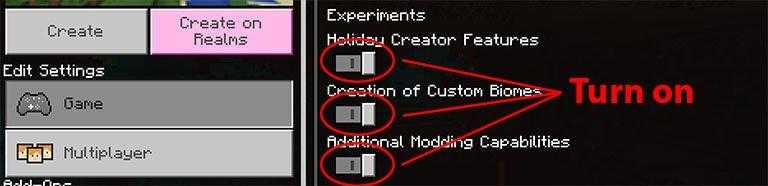
Requires Experiments
Compatible Versions

  • 1.16.100 or higher
  • 1.16 BETA
  • Doesn´t works on another version

Download Addon

  • CLICK HERE TO DOWNLOAD ADDON

Explorer’s World Map & Minimap

Explorer’s World Map & Minimap

A site dedicated to providing new and
updated Minecraft mods to enhance
your gameplay.

  • Follow
  • Follow

Quick links



Addons



Textures



Shaders



Seeds



Maps

Join Us

Subscribe to receive the latest Minecraft mods updates right to your inbox!

© 2026 Universe Bedrock. Al rights reserved.

We are using cookies to give you the best experience on our website.

You can find out more about which cookies we are using or switch them off in .

Powered by  GDPR Cookie Compliance
Privacy Overview

This website uses cookies so that we can provide you with the best user experience possible. Cookie information is stored in your browser and performs functions such as recognising you when you return to our website and helping our team to understand which sections of the website you find most interesting and useful.

Strictly Necessary Cookies

Strictly Necessary Cookie should be enabled at all times so that we can save your preferences for cookie settings.