

This addon adds a new block to the game called the Disenchanter Table. The Disenchanter Table is unique block that will add a whole new disenchanting mechanic in the game.
To start disenchanting first craft the table:
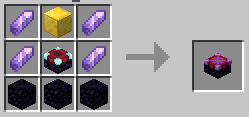
How to use:
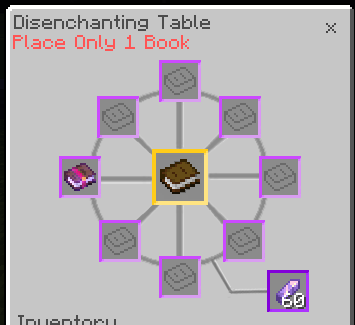
- Put the enchanted equipment or book in the middle.
- Put Books around it, only put 1 book per slot.
- Add the amethyst shard on the bottom right slot.
Change the UI a little bit for mobile and PCs to fit the UI for mobile.
Classic UI Profile:
Pocket UI Profile:
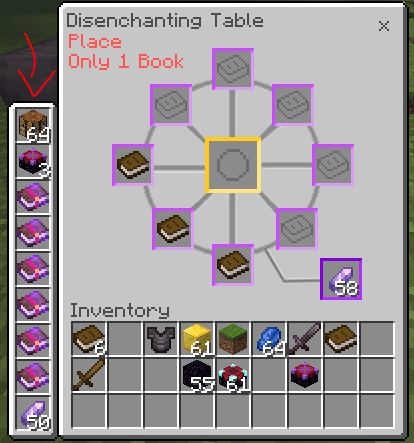
In the mobile UI the hot bar has been moved to the left side.
UI Breaking?
If the UI of the disenchanter is breaking (turning into chest), change the disenchanter settings in the behavior pack:
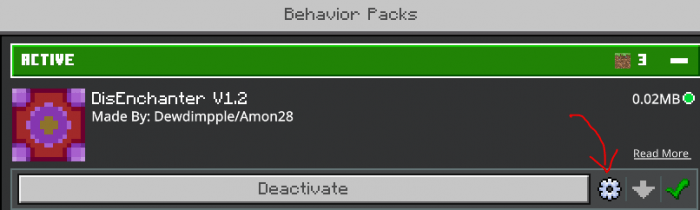
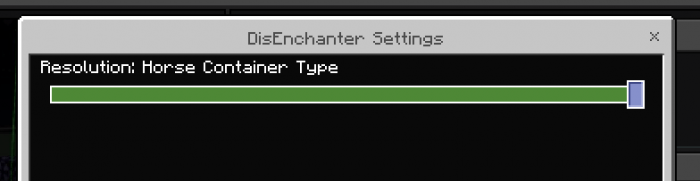
There are are settings Chest container and Horse container. Chest container should be the default but there is a high chance the ui will break when partnered with other addons, but Horse container has less chance of the ui breaking.
tldr; Horse container for high chance of working.
Video
If you encountered any problems join my discord server: My Discord
Reminder
You are not allowed to create your own download link.
You are not allowed to share the direct link.
Feel free to make videos just credit.
How Is It Installed?
- Download the file from the bottom. After you have downloaded files, tap on each one and it will automatically take you to your Minecraft, it will import the file into your game.
- Then go to the world where you are going to use the downloaded addon: Edit the world> resource packs> (Activate the resource pack) and finally: Edit the world> behavior packs> (Activate the behavior pack)
Download Addon
| VERSION | DOWNLOAD |
|---|---|
| v.1.0 (Recommended) | Disenchanter Table Addon (365 downloads ) |